
How to Troubleshoot Volume Issues on Apple AirPods Max 2 Quickly
If your Apple AirPods Max 2 are not playing at the right volume, you are not alone. Many users run into this problem. The good news is that most volume issues are easy to fix. This guide will walk you through every step, from the simplest checks to more advanced solutions.
Start With the Basics
Before diving into complicated fixes, always check the simple things first. Many volume problems come from overlooked settings. These quick checks take less than a minute each.
Check the Volume on Your Device
Your iPhone, iPad, or Mac controls the volume sent to your AirPods Max 2. Open your device and press the volume buttons. Make sure the volume is not set too low or muted. Also, check whether your device is in Silent Mode. On an iPhone, the small switch on the left side of the phone controls this. If it shows an orange line, your device is silenced.
Additionally, go to Settings and tap Sounds and Haptics. Look at the Ringer and Alerts slider. This setting can affect how audio plays through your headphones in some apps.
Inspect the Digital Crown
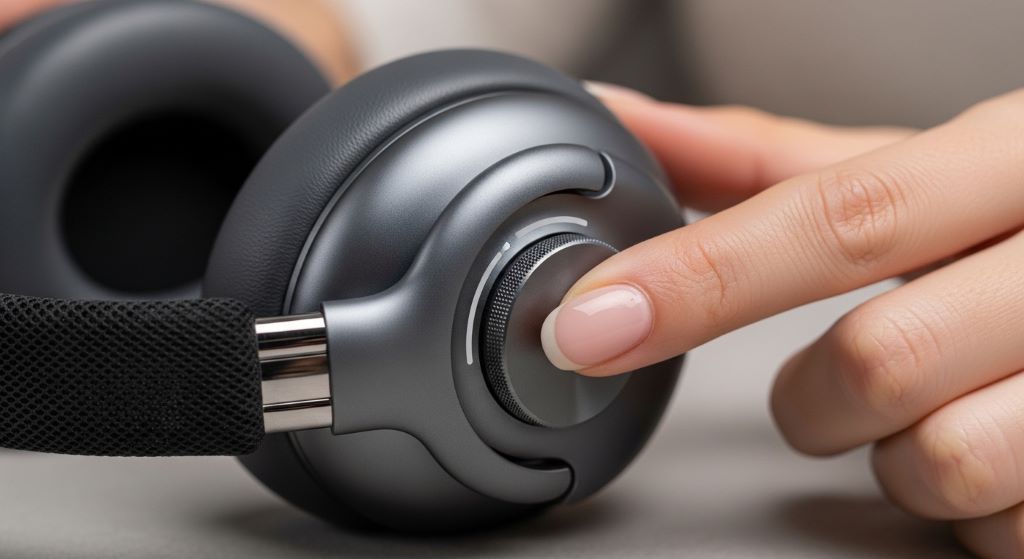
The AirPods Max 2 feature a Digital Crown on the top of the right ear cup. You can rotate it to adjust the volume directly on the headphones. Make sure you are rotating it in the right direction. Turn it clockwise to raise the volume. Turn it counterclockwise to lower it.
Sometimes the Digital Crown gets stuck or feels stiff. If that happens, gently clean around it with a dry, soft cloth. Dirt and debris can interfere with its movement.
Check Your Audio Settings in iOS
Your iPhone or iPad has several audio settings that directly affect your AirPods Max 2. Therefore, it is worth reviewing all of them before trying anything else.
Look at the Volume Limit Setting
Apple includes a Volume Limit feature to protect your hearing. However, this setting can make your AirPods Max 2 sound too quiet. To check it, open Settings on your iPhone. Tap Music, then tap Volume Limit. If it is turned on, you will see a slider. Move it to the right to allow a louder maximum volume. You can also turn it off completely if you prefer.
Review Accessibility Audio Settings
Go to Settings, then Accessibility, then Audio/Visual. Here you will find a Balance slider and a Headphone Accommodations option. Make sure the balance slider is centered. An off-center balance can make one ear sound louder than the other. This may trick you into thinking the overall volume is wrong.
Additionally, check Headphone Accommodations. This feature adjusts audio for hearing needs. It could be boosting or reducing certain frequencies in a way that affects your listening experience.
Turn Off Phone Noise Cancellation
Some users confuse Active Noise Cancellation (ANC) with low volume. However, these are separate features. ANC reduces background noise. It does not increase volume. Still, switching between ANC, Transparency Mode, and Off can sometimes reset audio behavior. Press and hold the Noise Control button on your AirPods Max 2 to cycle through the modes. See if this changes how the volume sounds.
Reconnect and Re-Pair Your AirPods Max 2
A faulty Bluetooth connection can cause audio dropouts and inconsistent volume. Therefore, disconnecting and reconnecting your AirPods Max 2 often solves the issue quickly.
Disconnect and Reconnect via Bluetooth
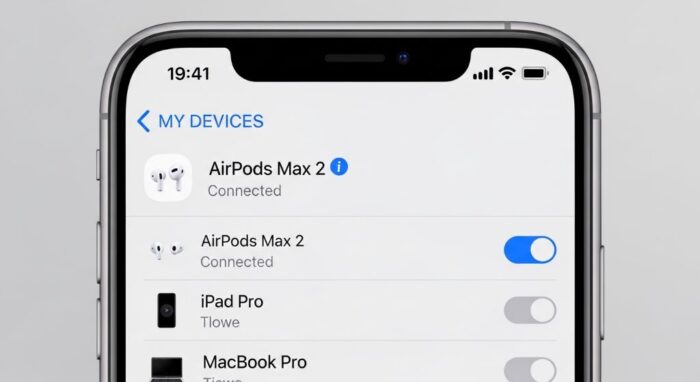
Open the Settings app on your iPhone. Tap Bluetooth. Find your AirPods Max 2 in the list. Tap the blue information icon next to their name. Then tap Disconnect. Wait five seconds. Put your AirPods Max 2 back on, and they should reconnect automatically.
If they do not reconnect right away, tap their name in the Bluetooth list to connect manually. Check whether the volume is back to normal after reconnecting.
Forget the Device and Re-Pair From Scratch
If a simple reconnect does not help, try unpairing your AirPods Max 2 completely. Go back to Settings, then Bluetooth. Tap the information icon next to your AirPods Max 2. Tap Forget This Device, then confirm.
Next, reset your AirPods Max 2. Press and hold the Digital Crown and the Noise Control button at the same time. Hold them for about 15 seconds until the LED flashes amber and then white. Now bring your AirPods Max 2 close to your iPhone and follow the on-screen pairing instructions. This fresh connection often clears lingering audio issues.
Update Your Firmware and Software
Outdated software is a common cause of audio problems. Apple regularly releases updates that fix bugs and improve performance. Therefore, keeping everything up to date is essential.
Update iOS or iPadOS
Go to Settings on your iPhone or iPad. Tap General, then Software Update. If an update is available, tap Download and Install. Make sure your device is connected to Wi-Fi and has enough battery before starting the update.
Check for AirPods Firmware Updates
Your AirPods Max 2 also have their own firmware. Apple updates this firmware automatically when your AirPods are connected to your iPhone and charging. However, you can check the current version manually. Go to Settings, then Bluetooth. Tap the information icon next to your AirPods Max 2. Scroll down to find the Firmware Version. You can compare this number to the latest version listed on Apple’s support page.
To encourage a firmware update, connect your AirPods Max 2 to your iPhone and plug your iPhone into a power source. Leave them together for about 30 minutes. This usually triggers any pending firmware update.
Try a Different Audio Source
Sometimes the problem is not with your AirPods Max 2 at all. Instead, it could be with the app or media you are using.
Test With Multiple Apps
Play audio through a few different apps. Try Spotify, Apple Music, YouTube, and a podcast app. If the volume sounds normal in some apps but not others, the problem is likely within a specific app’s settings. Check that app’s in-app volume or equalizer settings. Many apps have their own volume controls that work independently from your device’s main volume.
Check the Audio Balance in Your Media
Some audio files and videos are recorded at a low volume. This is especially common with older recordings or user-uploaded content. Try playing a different song or video to see if the volume returns to normal. If the volume seems fine on most content, your AirPods Max 2 may be working perfectly.
Reset Your AirPods Max 2 to Factory Settings
If nothing else works, a factory reset is your next step. This clears all settings stored in your AirPods Max 2 and gives you a completely fresh start.
To reset, press and hold the Digital Crown and the Noise Control button at the same time. Keep holding them for about 15 seconds. The LED light will flash amber first, then white. Release both buttons when you see the white flash. Your AirPods Max 2 are now reset and ready to pair again.
After the reset, pair them with your iPhone as if they are brand new. This process fixes many persistent audio problems, including unusual volume behavior.
Contact Apple Support
If your AirPods Max 2 still have volume issues after all these steps, the problem may be hardware-related. In that case, it is time to contact Apple Support. You can reach them online at support.apple.com, through the Apple Support app, or by visiting an Apple Store in person.
Apple may repair or replace your AirPods Max 2 if they are under warranty. Check your warranty status by entering your serial number on Apple’s coverage check page. The serial number is listed in Settings, Bluetooth, and then under your AirPods Max 2’s information.
Conclusion
Volume issues on the Apple AirPods Max 2 can be frustrating. However, most problems have simple solutions. Start by checking your device’s volume settings and the Digital Crown. Then review your iOS audio settings, including the Volume Limit and Accessibility options. If those steps do not help, try reconnecting or re-pairing your headphones. Additionally, make sure your software and firmware are up to date. Test different apps to isolate whether the problem is with your AirPods or a specific app. If necessary, perform a factory reset for a fresh start. Finally, contact Apple Support if the issue persists. By following these steps in order, you can resolve most volume problems quickly and get back to enjoying your music.
Frequently Asked Questions
1. Why is one ear of my AirPods Max 2 louder than the other?
This is usually caused by an off-center audio balance setting. Go to Settings, then Accessibility, then Audio/Visual. Make sure the Balance slider is in the center position. Earwax or debris blocking one ear cup can also cause this issue.
2. Why does the volume on my AirPods Max 2 keep changing on its own?
This often happens due to Automatic Ear Detection. When the headphones detect a change in how they are being worn, they may adjust the audio. You can turn off Automatic Ear Detection in Settings, Bluetooth, and then under your AirPods Max 2’s information.
3. Why is my AirPods Max 2 volume so low even at full setting?
Check the Volume Limit setting in Settings, Music, Volume Limit. If it is turned on, raise the slider or turn it off. Also check Headphone Accommodations in Accessibility settings, as this feature can reduce certain sound levels.
4. Can a firmware update fix volume problems on AirPods Max 2?
Yes, firmware updates from Apple often include bug fixes that resolve audio issues. Keep your AirPods Max 2 connected to your iPhone while charging to receive updates automatically.
5. How do I know if my AirPods Max 2 need to be repaired?
If you have tried all the troubleshooting steps and the volume is still abnormal, the issue may be hardware-related. Contact Apple Support and check your warranty status at apple.com/support. Apple technicians can diagnose and repair or replace your headphones if needed.
Related Topics:
Luxury Tech-Enabled Clothing Care and Maintenance
Elevate Aerial Photography: The Top Luxury Drones of 2025
 Best Affordable Over-Ear Headphones in New York (NY) – Which Ones Deliver Premium Sound Without the Premium Price?
  Elevate Your Aerial Photography: The Top Luxury Drones of 2025
  Luxury Tech-Enabled Clothing Care and Maintenance
  Why Choose A Homde Jewelry Box For Secure Storage?
  How To Organize With A Songmics LED Jewelry Cabinet?
  How to Assemble a Dumos Mirror Jewelry Cabinet
  How to Clean a Timex Tribute Stainless Steel Watch